100% Free Demo Access
Open the embedded reference Space and try the available MiniMax H3 workflow without paying Free Video AI, buying credits, or starting a subscription here.

Use MiniMax H3 completely free through the embedded demo, then explore official examples and an open-source H3-Base deployment path. Create multimodal video with text, image, video, and audio context, native stereo sound, and up to 2K output in the complete H3 workflow.
Experiment with the community-hosted MiniMax H3 reference interface directly below. Free Video AI does not charge credits, subscriptions, or an access fee for this embedded experience.
This demo is hosted and operated as an external Hugging Face Space. Prompts and uploaded references are processed by that service, not locally by Free Video AI. Availability, queues, limits, moderation, and data handling are controlled by the Space provider.
Open the demo in a new tabH3 unifies multimodal understanding, video generation, editing, and synchronized audio in one general-purpose system instead of separating every creative task into a different model.
Open the embedded reference Space and try the available MiniMax H3 workflow without paying Free Video AI, buying credits, or starting a subscription here.
Describe how text, images, reference videos, and audio relate to the target. H3 is designed to interpret the full relationship instead of treating each input independently.
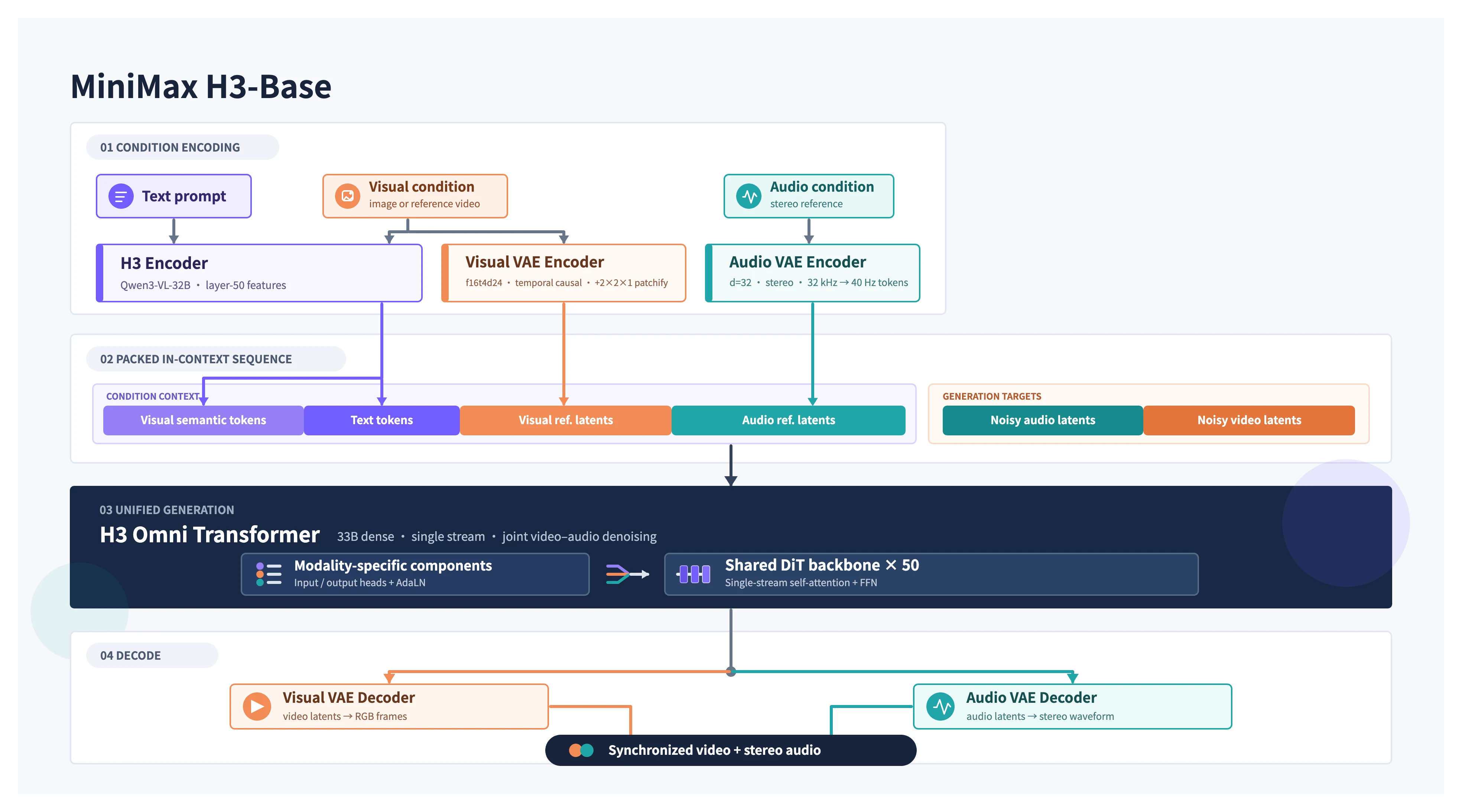
Generate picture and sound together, including dialogue, environmental effects, and music, with native 32 kHz stereo output in the documented H3 system.
Official specifications cover 4–15 second outputs, 24 FPS, and common landscape, square, portrait, and cinematic aspect ratios.
The complete H3 pipeline can regenerate a 768p base result at 2K while reusing the original multimodal context to recover more faithful fine detail.
Developers can download FL2VA and Ref2VA H3-Base checkpoints, inspect the implementation, and build a self-hosted 768p generation workflow.
Move from free experimentation to repeatable production with three focused Flaq AI endpoints for text, image, and multimodal reference video generation.
Looking for a Seedance 2.0 alternative? MiniMax H3 combines multimodal control, native audio, open H3-Base weights, and production API options in one flexible workflow.
Animate a source image with prompt-guided motion, synchronized audio, and a managed API workflow suited to product shots, portraits, ads, and visual concepts.
Generate audiovisual clips directly from detailed prompts through a stable endpoint designed for repeatable creative automation and scalable video production.
Use multimodal references to guide identity, visual style, movement, voice, and sound when a production needs more control than prompt-only generation.
API availability, pricing, rate limits, and model behavior are provided by Flaq AI and may change. Review the current API documentation and pricing before production use.
These reproducible 768p outputs come from the official MiniMax H3 GitHub repository and illustrate three core generation modes.
Turn a written scene description into a video sequence with jointly generated sound using the FL2VA checkpoint family.
View official GitHub sourceGuide motion and composition with zero, one, or two images for text-to-video, first-frame, last-frame, or first-and-last-frame generation.
View official GitHub sourceUse reference images, video clips, and supported audio together to control identity, movement, visual style, voice, and sound.
View official GitHub sourceExample videos are provided by MiniMax-AI in the MiniMax-H3 repository. Results vary by prompt, references, checkpoint, inference settings, hardware, and workflow.
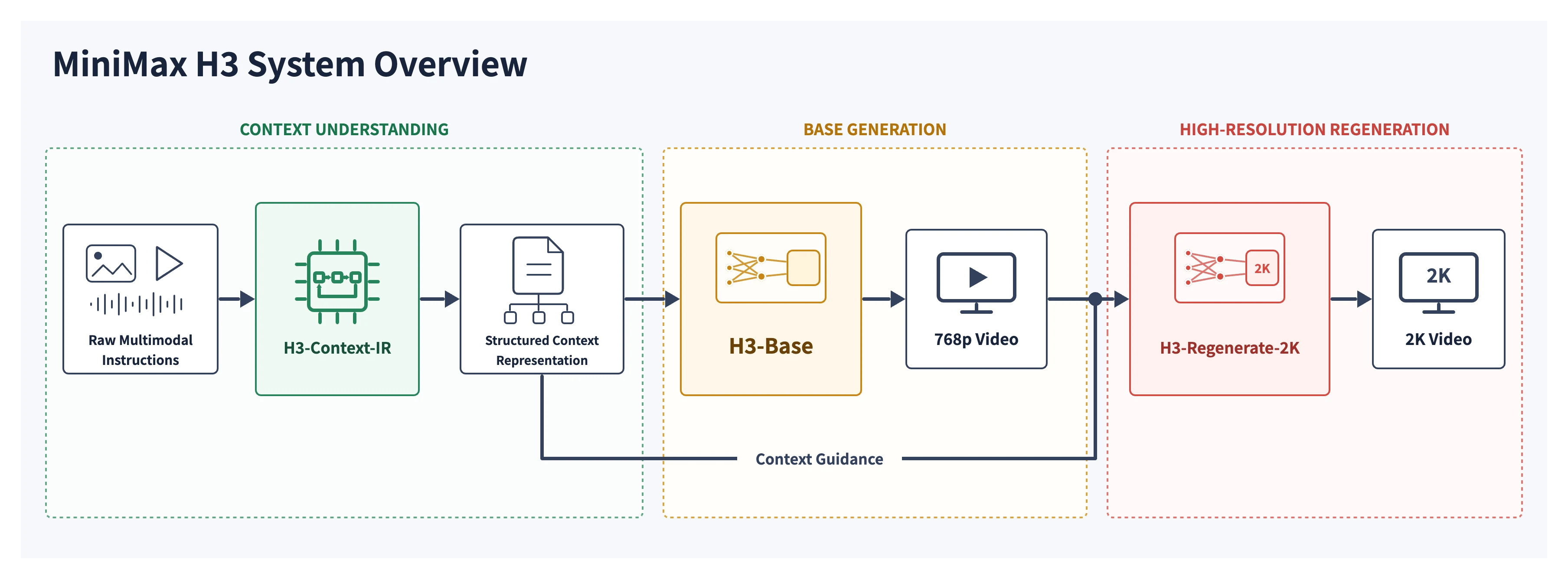
The documented H3 system separates deep context interpretation, base audio-video generation, and high-resolution regeneration while keeping the original creative context available across the workflow.

Language becomes the bridge between prompts and mixed media, describing relationships among subjects, shots, motion, sound, and the target output.
A hosted preprocessing system interprets free-form multimodal instructions and converts them into a structured representation for generation.
The open base model jointly predicts visual and audio latents through a general-purpose H3-Omni Transformer and produces 768p audio-video output.
The final module reuses both the base result and original context to regenerate higher-resolution details rather than applying conventional super-resolution alone.
Use a single multimodal workflow to explore commercial concepts, narrative scenes, brand design, motion references, and synchronized audiovisual ideas.
Prototype product commercials, campaign concepts, launch visuals, pack shots, and social ads with stronger instruction following and text rendering.
Turn scene descriptions, character images, motion references, and sound direction into short cinematic studies before production.
Explore animated identities, product website concepts, title sequences, poster motion, and branded visual systems.
Transfer motion, preserve a subject, reference a visual style, or use audio and video context to describe a targeted transformation.
Develop character moments, game intros, stylized 3D shorts, animated posters, and visual experiments across varied art directions.
Test short audiovisual concepts with documented stable dialogue support across 11 languages and additional languages at varying quality levels.
Start with the embedded demo, make the creative relationship between every reference explicit, and review the complete audiovisual result.
Open the embedded Space and select the available text, first/last-frame, or multimodal reference workflow.
Write a precise prompt and add supported references. Explain which image, video, voice, motion, sound, or style should influence the target.
Submit the task, wait for the hosted queue, then inspect motion, identity, text, dialogue, sound effects, music, and overall instruction following.
The official repository provides FL2VA and Ref2VA checkpoints plus recipes for SGLang, vLLM, diffusers, and ComfyUI. Start with the local 768p H3-Base workflow and scale only after validating your hardware and use case.
hf download MiniMaxAI/MiniMax-H3 \
--include "model_index.json" "FL2VA/*" \
--local-dir MiniMax-H3
sglang serve \
--model-path MiniMaxAI/MiniMax-H3 \
--num-gpus 4 --ulysses-degree 4 \
--performance-mode speed \
--host 0.0.0.0 --port 30010 \
--model-variant fl2va
Read the Community License, repository guidance, checkpoint sizes, and framework-specific GPU requirements before downloading model weights.
Use FL2VA for text and first/last-frame generation, or Ref2VA when the workflow needs mixed image, video, and audio references.
Scope the Hugging Face download to one task family or let diffusers fetch the required components to reduce storage and setup time.
Start the selected framework, reproduce an official case, compare audiovisual output, and then decide whether to integrate the hosted 2K workflow.
Important: open weights do not make GPU compute free. Review the MiniMax H3 Community License before deployment. The current open release includes H3-Base, while H3-Context-IR and H3-Regenerate-2K are hosted components used by the full official 2K workflow.
After generating an H3 clip, increase its working resolution locally, correct its orientation, or cut a shorter highlight with the rest of the toolkit.
Generate
Try the hosted multimodal H3 demo, watch official examples, and follow the open H3-Base deployment path.
Open free toolEnhance
Increase video resolution by 2× or 4× with private local processing and optional WebGPU neural enhancement.
Open free toolMirror
Flip a video horizontally, vertically, or both ways with a private preview and local browser export.
Open free toolCut
Choose an exact start and end time, preview the source, and export a focused clip without uploading it.
Open free toolContinue with primary sources covering the launch, open implementation, checkpoints, workflows, and model license.
Read MiniMax's explanation of multimodal context, native stereo sound, H3-VAE, the Omni Transformer, and in-context 2K regeneration.
Open resourceOfficial resourceReview checkpoint structure, supported input modes, deployment commands, reproducible cases, prompt skills, and current open-source boundaries.
Open resourceOfficial resourceCheck the official Hugging Face release, model files, Community License, and framework-specific loading guidance before deployment.
Open resource